
Last Updated on March 5, 2026 by Vincent Blaauw

Smart-IT now offers a way of syncing stock levels and pricing between Smart iT and Takealot.
You will still need to create the items on your Takealot Portal.
You can add a % on top of your Price Level 10 selling price if you wish.
Syncing can be done manually or automatically.
To Create an API Key on your Takealot Portal.
You can generate an API key from within the Takealot Seller Portal by following these steps:
1. Log in to your Takealot Seller Account.
2. In the left-hand navigation menu, click on API Integrations.
3. Select Seller API from the dropdown options.
4. Scroll down the page to the Authentication section.
5. If a key does not already exist, click the Generate API Key button. If one does exist, you can copy the current key.
6. Immediately copy the generated API key and store it in a secure location. For security purposes, the key is only displayed once during generation.
7. If you lose your key, you will need to generate a new one, which will invalidate the old one.
Once you have your API key, you can use it to integrate with Smart-IT.
To Setup Smart-IT
Make sure you are on the 22 January 2026 version of our software or newer.
To Setup the Integration in Smart-IT, click on the Company Tab.
Click on the dropdown menu under Integrations and click on Takealot.
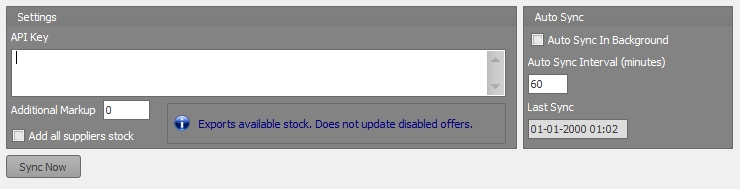 Insert your API you created on the Takealot Portal.
Add your Additional Markup % if desired.
If you want to add all your supplier stock on hand tick the tick box for Add all supplier stock.
If you want it to auto sync tick the tick box Auto Sync in Background and type in the sync interval.
Please contact us if you require any further assistance.